Monday, December 3, 2012

Visio lite: Google Docs Draw

Often I have clients asking about how they can visualize their processes and other aspects of their business.

The obvious answer is always Microsoft's Visio. Don't get me wrong--it's a great product that allows free-form and rigid design all the same.

But it's overkill for the average business person, and suffers from an avalanche of features that most people looking for a simple sketching tool won't ever exploit. Not to mention of course that it's expensive!

Of course, in a cloud-enabled world, we can avoid costly and time-consuming management of desktop software like Visio. Imagine if Google had a cloud-connected version of Visio?! Well, in a word, they do!

Enter Google Docs Draw. Basically it lets you create shapes, and link them with unbreakable lines that move and snap to your shapes. This makes it really easy to create simple flowcharts and organizational aides.

Some features

  • Collaborate - share and collectively modify drawings with people inside and outside of your organization
    • It's very trippy and cool to see someone moving some shapes around in a corner of the document
  • Connect shapes with unbreakable lines
  • Export PDF or image files of your Draw documents

What kind of things can you do with Google Draw?

Do some basic graphic design:

Plan out the flow of your phone menu and secretarial procedures:

Or insert a background picture and add on top of that. Here, a basic Gantt chart:


Mock up some forms for graphic design:

Design some user interfaces for software:

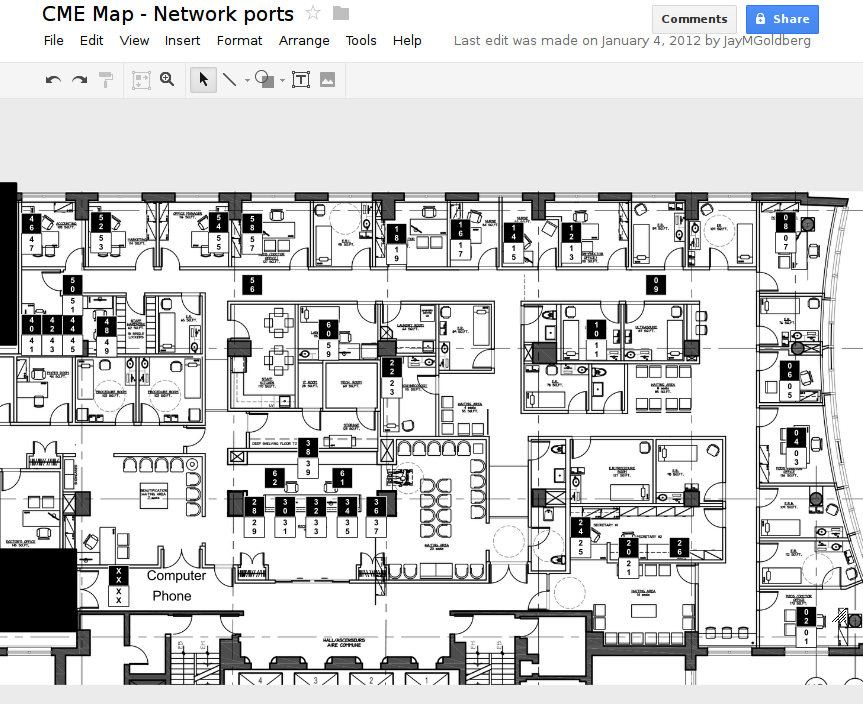
 Make a floor plan:

Some other tips

 I've found that some people are confused about the "canvas"  or viewable area in Google Docs Draw. They don't understand that your drawing can actually be larger than the canvas, and wonder why when they export the drawing, there are edges or entire portions that are missing!

The canvas is represented by a checkered pattern as illustrated in the above screenshots. If any part of your image is outside of this area, it will be clipped off when you export the image to another format using File->Download as->

Please note of course, that if you share the Google Drawing, the people whom you share it with will see everything, inside the canvas or not.

Say for example you want to show a portion of a proprietary document to an outsider? In this case, we can resize the canvas to expose only the area that we want to show, then export as a PNG or JPEG that can be sent by email to a semi-trusted party. The recipient will see only the area inside the canvas.

Here's an example where the canvas only encompasses a small part of the entire drawing.
And now, when I export as a PNG file, the recipient sees:

Another good use of the canvas is if you have a set of small figures that you are using as a library, where you copy items from off of the canvas and paste them into the viewable area. When you export, all of those little items you've left off to the side will not be visible!

In summary, Google Docs Draw is not Visio, but for many purposes it fits the bill for ease of use, availability, and functionality.

Thursday, September 20, 2012

Why people get malware

As an IT consultant I can always lament the fact that people just don't seem to care enough about their computers.

On the other hand, the Internet can be a treacherous place where one can be baited into anything. See the below screenshot for a view of a website where you can download a particular piece of software.


See all of the Download buttons (I count 3). Note that none of those is the correct one!

Would I expect a normal person using a computer to understand which one to click? I don't think so. To me it's obvious, but I'm not your average user.

Recently I have been spending some time with a yoga instructor, and I have to say that from the outside, remaining mindful of the body becomes an all-encompassing process that yields great rewards in spirit and energy.

Imagine if people treated their computers as their holy temple, their valuable body.

I'm still entranced by the idea that many users treat their machines so poorly, as though they are unimportant adornments to their modern life, but Zeus help me if that same computer breaks! The user bemoans and grieves the loss of their digital companion as if they could not possibly drudge on in this waking life without email and Facebook. And of course by extension I am called up and asked to work miracles, where even real miracles cannot fix the damage. Here at AvianBLUE we are only human.

Don't know what you have till you've lost it, right?

So here's to the tender care and feeding of your trusted computer:


  1. Tap thee lightly on the keypad, for these letters facilitate your once-hourly Facebook updates: "I'm having soo much fun sipping a latté at Starbucks!"
  2. Gently remove thy dust bunnies from between the finger-keys and fan-apparati using the purposeful breeze of a canned windstorm with attached straw, available at your local supplier of office doodads.
  3. Lay heed to the words and wisdom of your IT guru, update and upgrade often, as this is the spiritual path to computer enlightenment.
  4. Carry one's computer companion with the loftiness of a cloud, and set lovingly upon the clean and composed workspace.
  5. Tread only the clean areas of the Internet, and beware the pitfalls as described above.

rsnapshot - It's for pulling, obviously

It's been a few months since I learned about rsnapshot, a neat little utility that uses hard linking to create multiple point-in-time snapshots of your data. It combines the neat features of rsync into a package that does more than just mirror data.

If you've ever had clients who suffer from "data decay", you'd know that just having the most recent version of a file can be useless. An Excel spreadsheet could have been corrupted weeks ago, and people will continue to write changes to it--despite warning messages--until it really fails hard, which is always too late.

Conceptually I was having a hard time understanding the topology of rsnapshot server and the clients it's supposed to back up. Such questions were:

  1. Are you supposed to have rsnapshot on every client machine, connecting to the server in a push fashion?
  2. Is /etc/rsnapshot.conf supposed to exist on every machine you are backing up?
  3. Or does the server login to all client machines and initiate a pull backup?
  4. Can I store the backup repo on a network share?
  5. Does it use only rsync? 


As per #4, I was quite foolishly modifying the snapshot_root directive in /etc/rsnapshot.conf to point to a network location (CIFS share), even though the comments in that file clearly state that it's supposed to be a local root. I guess this should have been a no-brainer, but in my skimming of the documentation it wasn't clear why I couldn't set the snapshot_root to be a network location!

Only when I tried to use rsnapshot in conjunction with a TeraStation Live did I learn the truth! Behold, rsnapshot sits on the server, manages it's own backup root, and communicates with clients using only rsync, or rsync over SSH (answer to question #5. This makes sense because the rsnapshot server must scan its local repositories for changes, and it does folder rotation. The server can't know what's changed on the client unless it stores state information over there, and if that client dies, then you would lose that data!

For example:
daily.0/
daily.1/
daily.2/
daily.3/
daily.4/

Say you set retention to 5 days. This means that the next daily will cause a rearrangement. daily.2/ becomes daily.1/ and daily.1/ becomes daily.0/, and daily.0/ disappears.

I'll be posting a second note on how to initiate a VSS snapshot of a Windows drive over SSH in preparation for a pull backup from a Windows client to a Linux server. For reference I'm looking at TimeDicer, a GPL tool for doing rdiff-backup of a running Windows system.

Friday, August 31, 2012

Windows Vista and Windows 7 Batch Uninstallation

One of my biggest gripes with Windows 7 is how long it takes to manage the install and uninstall of software packages.

I can be assured that when receiving a new Lenovo notebook for a client for example, I will spend 30 "active minutes" and 30 "waiting minutes" simply removing software I don't need--and babysitting the Windows installer. That's an hour of time when my average site visit is 4 hours in length, what a waste!

This is a job that should take 30 seconds of active time and maybe 5 minutes of waiting.

So, the Windows installer framework in Windows Vista and later:

  1. Has no concurrency (seems MS has still not figured out how to handle shared libraries and dependencies)
  2. Is doggedly slow
  3. Assumes I am too dumb and my time is worth nothing

Constrast to Windows XP

In Windows XP, application vendors often had uninstall links in their Programs folder on the Start Menu, allowing you to simulate some kind of concurrency.
In Windows 7 the trend seems to be that applications remove the uninstall links from their Start Menu folders, you must use "Programs and Features" in Control Panel.

Using uninstall links allowed you to work around the problem of uninstalling multiple programs at the same time.

The New Framework

The Microsoft Install framework is "too smart" and will not let you modify two software packages that both use Windows Installer, and this is just a real bummer.

Not to mention that Windows Installer is just damn slow, and insists on "Collecting the required information for like 5 minutes while there is no sign of the dialogs actually doing anything, and no disk or CPU activity. "Please wait while the current package is being configured." It seems like the developers at MS wrote this as part of their installer code:
if package.is_installing():
  package.wait(5);
in an endless loop.

The Proper Solution

Contrast this with most Linux package management systems' process for removing firefox, gimp, libreoffice in one fell swoop:

Arch Linux
pacman -R firefox gimp libreoffice

Debian
apt-get remove firefox gimp libreoffice

Ubuntu
sudo apt-get remove firefox gimp libreoffice
CentOS
yum remove firefox gimp libreoffice

Do What Mac OS X does

Or we can even use Mac OS X and drag the applications from the Applications folder to the trash bin and get it over with. Thanks, Apple!

More time = more money

But after all this, the realization hits me: Microsoft is helping me to make money by bumping up my billable hours. To my clients: honestly, it's not me being slow, it's MS!

There is one way to address this, by writing a script to do the in

wmic product where name="" call uninstall /interactive:off

from softwaretalk.info.

But there are flaws like half-removed programs, and there is no concurrency, you still have to uninstall one-at-a-time.

*Sigh* someday MS will get a clue.

Thursday, November 4, 2010

Web-based POS used by local hardware chain

While doing some improvements on the McGill Outdoors Club house up in Prevost, QC, we stopped at a local hardware store called "Matério". They're a chain in Quebec.

While standing in the checkout line, I became curious (as usual) about how their Point of Sale (POS) system worked. I snuck a peak at the touchscreens...

I could see that they were doing the entire sale in an IE window, with an internal  192.168.x.x URL. Every item that was scanned populated the webpage after a brief auto refresh.

Custom or Open Source?

The interface was all French, leading me to believe that this was a custom job written for them. But what a great idea! I would think that all POS systems should be web-based. This way your terminal manufacturer and OS are moot, as long as a web browser is available, you can process sales

UI Design

Couldn't help but notice that on the payment page (final page of a sale), there were about 5 fields stacked on each other, each field labeled for a method of payment (Interac, Credit, Cheque, Cash), but to get to the "Cash" field at the bottom, the cashier had to use the scroll bar on the right and drag to reveal the lower fields.

As a wannabe UI designer I surmised a couple of things:
  1. Page should fit on screen without scrolling, this is a design flaw
  2. IE should be running full screen without the address bar to save space--I shouldn't be seeing the URL at the top, it's a waste of space.

Some other possible snafus

Of course, a web-based PoS could have a few hurdles to get over.

  1. If there is a mag-stripe reader, how do you give focus to the correct field in the webpage without having the user tap to put the cursor there first? Is there a backchannel you can use to interface with the stripe reader rather than emulating an input device?
  2. Printer needs to be networked to the main server (serial-over-IP), as we can't guarantee that every terminal/PC using the PoS can reliably print to a local receipt printer.
Another establishment in my area, called Le Next Door, on Sherbrooke and Marlowe, has a custom built app based on Access it looks like. I spoke to the owner briefly about it (he wrote it, he's a CS grad), and from what little I can tell it's pretty simple to write POS software this way as a "native" application. He runs it on an ASUS all-in-one machine. Has a keyboard and mouse attached to it, which means it's not quite finished, in my opinion all functions should be available by touch screen.

Tuesday, October 19, 2010

rsnapshot - it's for pulling, obviously!


It's been a few months since I learned about rsnapshot, a neat little utility that uses hard linking to create multiple point-in-time snapshots of your data. It combines the neat features of rsync into a package that does more than just mirror data.

If you've ever had clients who suffer from "data decay", you'd know that just having the most recent version of a file can be useless. An Excel spreadsheet could have been corrupted weeks ago, and people will continue to write changes to it--despite warning messages--until it really fails hard, which is always too late.

Conceptually I was having a hard time understanding the topology of rsnapshot server and the clients it's supposed to back up. Are you supposed to have rsnapshot on every client machine, connecting to the server using only rsync? Actually, no.

Quite foolishly I was modifying the snapshot_root directive in /etc/rsnapshot.conf to point to a network location (CIFS share), even though the comments clearly state that it's supposed to be a local root. I guess this should have been a no-brainer, but in my skimming of the documentation it wasn't clear why I couldn't set the snapshot_root to be a network location!

Only when I tried to use rsnapshot in conjunction with a TeraStation Live did I learn the truth! Behold, rsnapshot sits on the server, manages it's own backup root, and communicates with clients using only rsync, or rsync over SSH. This makes sense because the rsnapshot server must scan its local repositories for changes, and it does folder rotation. For example:

daily.0/
daily.1/
daily.2/
daily.3/
daily.4/

Say you set retention to 5 days. This means that the next daily backup will cause a rearrangement. daily.2/ becomes daily.1/ and daily.1/ becomes daily.0/, and daily.0/ disappears. On a local filesystem, these reflect simple inode reference changes for moves and renames, but on a remote FS, all bets are off.

On a related note. I'll have a quick guide on how to get root access to a TeraStation LIVE, and how to install rsnapshot.

A second post will go over how to initiate a VSS snapshot of a Windows drive over SSH in preparation for a pull backup from a Windows client to a Linux server.

Monday, October 4, 2010

Mac OS X filesystems - Conspicuously lacking


I guess I'm a bit spoiled. Linux never leaves me hanging when I need to access a filesystem. Anything I throw at it--NTFS, FAT32, HFS+, ext2, ext3, XFS, ZFS.

The other day I was trying to help my sister install dual boot Ubuntu with Mac OS X Leopard (10.5). Apple's disk utility couldn't seem to resize the main HFS+ partition, claiming that there wasn't enough free space (even though 12GB was available). I figured it was a system file in use, so it was off to burn a 10.5 bootable DVD--because she's like everyone else and lost her original one. Who ever saves these things? I'm still dreaming of the day a client answers, "Yes!" to the question, "Do you have the original install CDs?"

I have an ext3 formatted disk with the OS X .iso file on it, and needed to use a Windows system that had a DVD-DL drive (the Mac OS X disk is 7.5GB). Even with the software from DiskInternals, couldn't get Windows to read the partition (the inode size was 256KiB instead of the 128 that Linux-Reader expected.) I had another Mac OS X install image on the Mac itself, but we find out that Mac OS X can only write FAT32, not NTFS, and with its 4GB filesize limit, it's impossible to copy the 7.5GB ISO to a flash drive. So the only filesystem you can use to copy 4GB+ files to other machines is HFS+!

Filesystems that support 4GB+ file sizes:
  • Outgoing from Mac
    • HFS+
  • Outgoing from Windows
    • NTFS
  • Outgoing from Linux
    • NTFS, ext2, ext3, xfs, HFS+ (journal disabled)


Look how flexible Linux is! I guess I thought that with its UNIX heritage, Mac OS X would have these extra filesystem drivers included "no charge", "for good will". Perhaps it's denial, as Apple has got its own little ecosystem you aren't supposed to stray from...

FYI, for $31USD, you can get NTFS for Mac, based on the GPL ntfs-3g software widely used in Linux. It may just be worth it. Personally, I'd just ditch Mac OS.